Runner’s guide Start here
Plan your week
Start with the goal and training week you can actually run. The calendar lets you build a plan and revisit individual sessions as your schedule changes.
Set your goal and usual week
In You → Coaching, review your goal, races and training preferences. Include the days you can run, the day you prefer for long runs and any constraints the coach should take into account. Choose miles or kilometres in your settings so distances and paces read naturally.
Generate a plan
Open Plan and choose Generate Training Plan. On a smaller screen the action may be shortened to Plan. Select a day to review the type, distance and workout instructions. The calendar distinguishes planned sessions, completed activities and races.
Use Regenerate when you want a new plan. Regenerating replaces planned sessions from today forward and preserves earlier dates. A dated goal race sets the end of a generated race plan. Logging a run updates your training history. If you want a different session for a particular day, use that day’s suggestion controls.
Change one session
Open a planned workout and choose Get Different Suggestion. Read the alternatives and their details before adding a replacement. On an eligible day without a planned workout, Suggest training lets you choose a session. A planned workout can also be removed from its detail view.
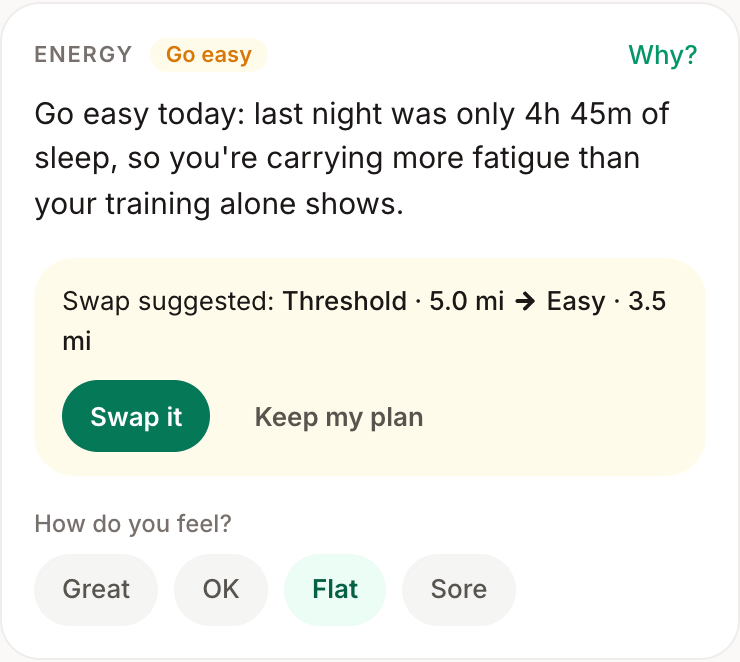
For example, after a Flat check-in and 4h 45m of sleep, Today might offer 3.5 miles easy in place of a planned 5-mile threshold session. Read the suggested swap, then choose Swap it or Keep my plan. After accepting a swap, use Undo if you change your mind.
Take the plan outside
In Today, open the planned run to record on iPhone or send it to the watch. The iPhone recorder can carry a workout link, planned shoes and heart-rate ceilings. The watch handoff can also carry structured intervals when the plan supports them.